
Following applys to kNiL’s server.
You need to be Administrator to ban!
inside a running game
via the onscreen admin menu
here is a croped screnshot of the current admin menus:

To make the onscreen admin menu show up, press the hotkey you defined before in autoexec.cfg. This will send the command sm_admin to the game console and the onscreen admin menu will show up.
If you don’t setup a hotkey for sm_admin yet, follow this instructions: How to set up your keybindings
via the game console
May not work at kNiL’s server!
Press your configured hotkey for open console anywhere inside the game.
If you don’t know this key, head to Main Menu>Settings>Configure Keyboard Layout.
In the console windows enter the command status to see connected players and their steamIDs:

Copy the desired SteamID into the clipboard and use it with the ban command:
# Syntax is
banid <minutes> <steamID>

# Example: How to ban the asshole with steamID STEAM_0:1:57654139 forever:
banid 0 STEAM_0:1:57654139
Tipp: How to try out the onscreen admin menu without the need to bound a key first
- Open the game console as described above.
- Enter the command
sm_menuand make sure to close your console window afterwards, because it might be in front of the onscreen menu, which is visible now. 🙂
Outside the game
For example, player europa asks me to ban this pice of shit:
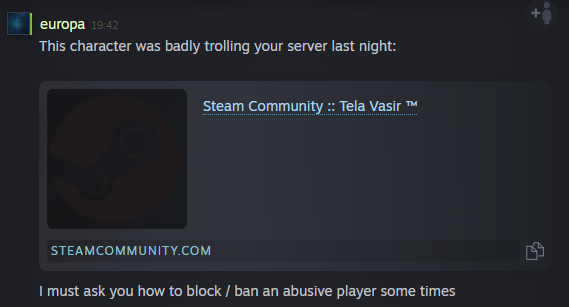
First we need to get the players steam_id. This ID is unique and provides the best way to identify this litte stinky sneaking shithead in the future and prevent any connection to the server.
For that open the players profile:
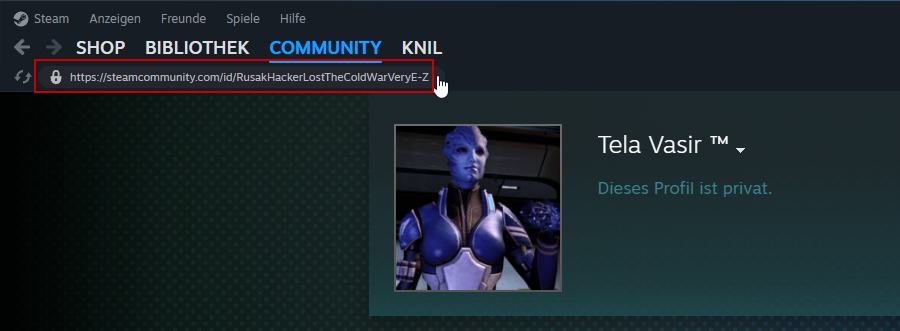
Copy the profile url to your clipboard. On Windows you just need to click on it.
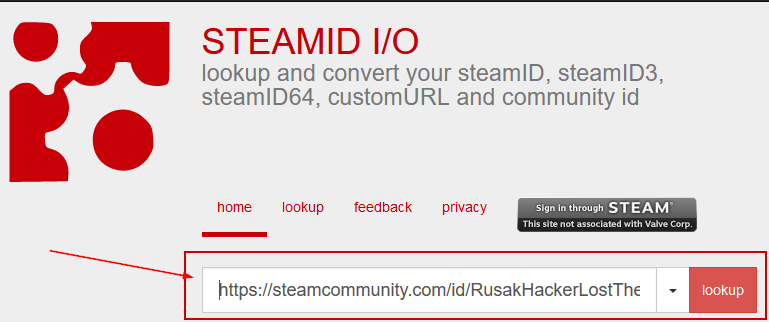
Paste it into https://steamid.io/ and click lookup.
Clicking the icon beside the steamID will copy the steamID to the clipboard.
In the screenshot below the motherfuckers steam_id is STEAM_0:1:57654139:
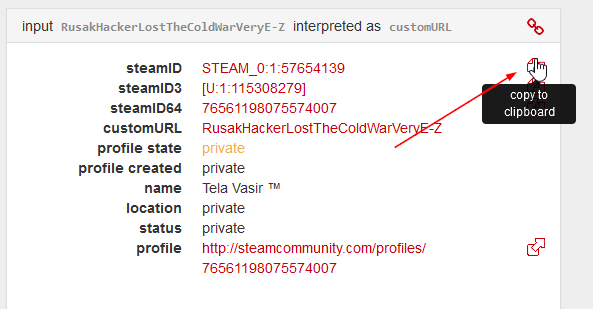
For now just send this steamID via Steam Chat and I will ban the bastard.
Future / to be continued…
How to ban players your own dedicated server