
Can’t see fire? Artefacts instead of explosions?
Often seen when the fullscreen-mode of an running game instance is interrupted. So, if some software makes L4D loose it’s full screen mode, this issue sometimes (!) happens.
You have to restart the game to solve that.
“No Steam ID” (and you get kicked)
This can happen to anyone on any server. Guess it’s something network-related: You get kicked, because the server was unable to verify your steamID in the steam network.
Normally you should be able to reconnect.
(If you need to restart the game, let me know!)
Players don’t hear me / my microphone is muted
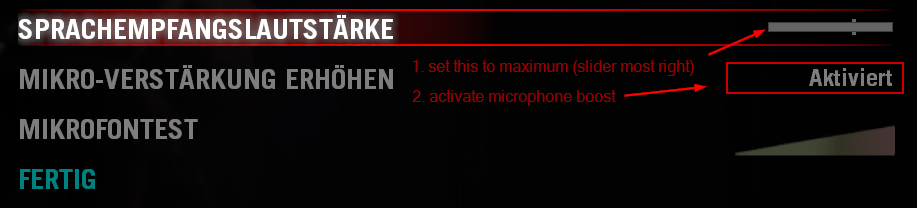
First, check these two relevant settings in the game options:
Adjust Windows 10 sound settings
Press Windows-R on your keyboard and enter mmsys.cpl.
Then follow these four clicks:
- Open the tab
record. - Click on the device that is the mic you want to use.
- Click on properties to open the mic properties.
- Open the tab
boost.
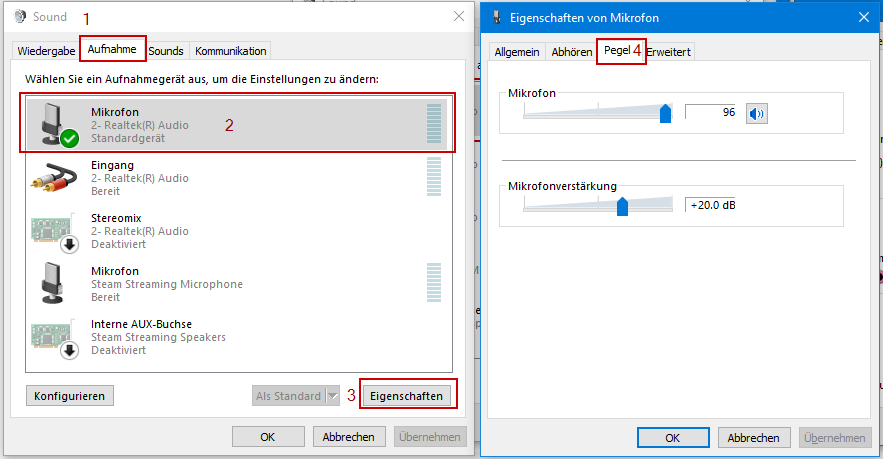
The last screen (4) is, where you have to find a suitable combination of recording volume and microphone boost for.
Only adjust one of them at the same time! Click apply and afterwards OK to apply the settings.
It may be necessary to restart L4D after any changes, to make them also apply to the game.
As last step after a change of your settings use the ingame microphone test function:

After activation of the ingame microphone test function you will see the bar moving while speaking into your microphone and L4D will playback your recorded voice after 1-2 seconds delay. Try to have the bar near yellow/orange while normal communication. Otherwise it may get to loud for the other players, if you laugh out or cry for help while playing.
L4D crashes / L4D doesn’t start
Crashes often can happen while playing certain (buggy) AddOn Campaigns.
If you want to make sure L4D on your computer is healthy and up-to-date, follow below next guide:
How to verify / repair L4D installation files?
This is really easy and does not affect your saved settings. All you need is your Steam Client.
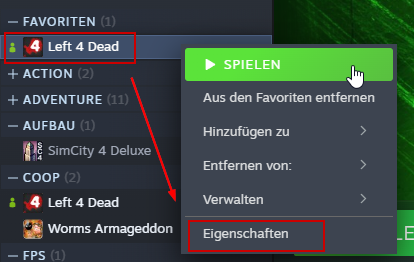
- Open your Steam Client and locate
Left 4 Dead - Right-click
Left 4 Deadand thenProperties
- In the next window click
Installationand then onVerify and Repair Game Files
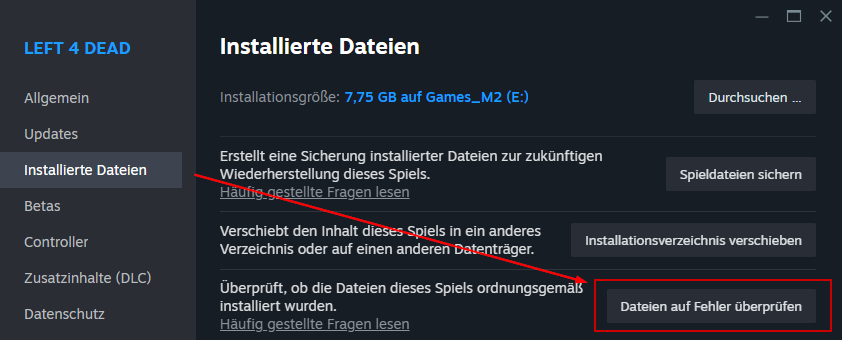
Steam will start to generate checksums of your local game files and compare them to the checksums they should have. Damaged files will queued for download to repair them. BTW you can do this with any other game, which was installed via Steam Client.
Network troubles (disconnects, laaaaags, bad ping, etc.)
Thats a bigger topic coming soon! tba!